 WEEP
The window and its tools
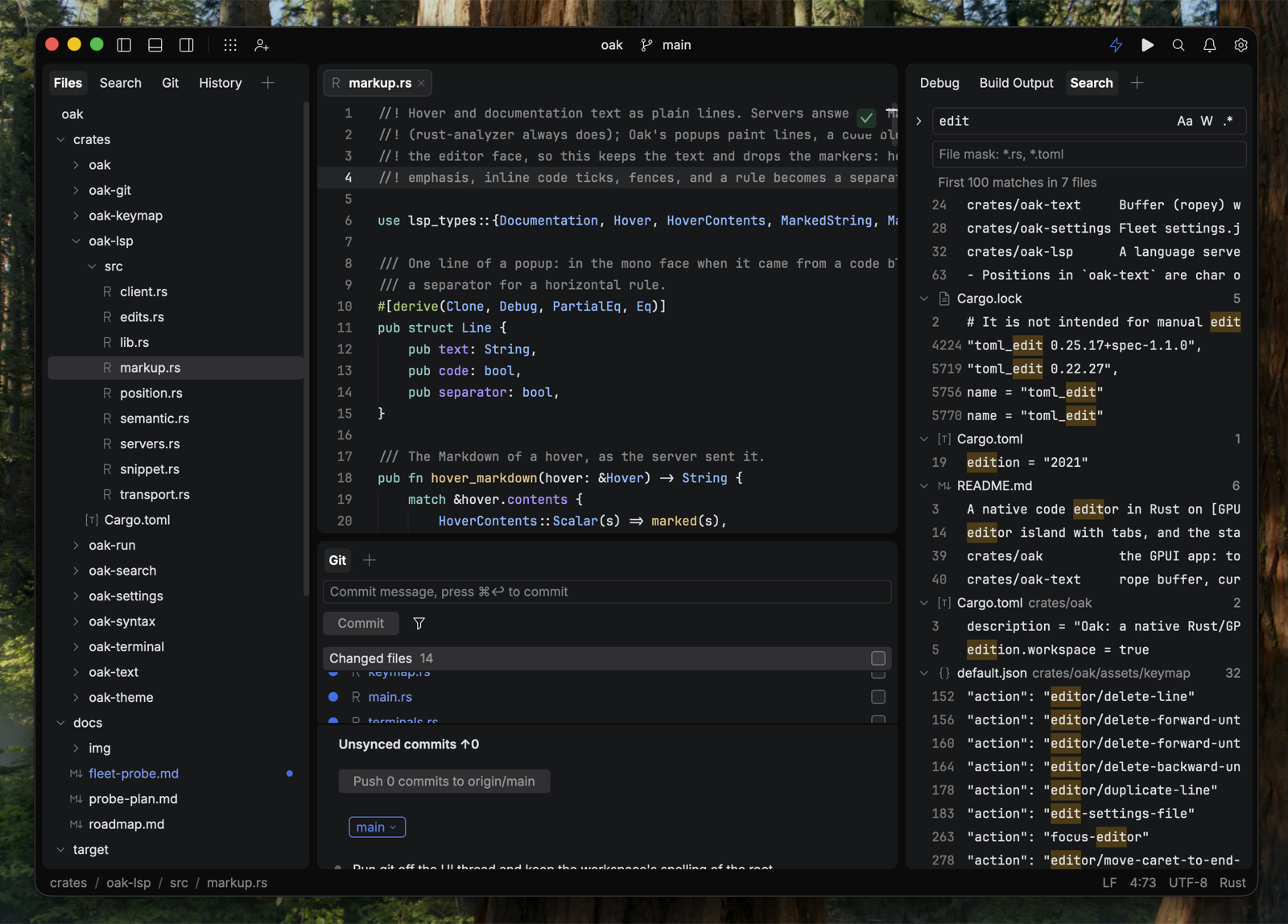
The window is Fleet's: a toolbar along the top, the editor island in the middle, and left,
bottom and right panels around it, each an island with its own tab row of tools. Panels
resize with draggable splitters and remember their widths; the + at the end of a panel's
tab row adds a tool to it. The status bar shows the file's path, the caret position, line
endings, encoding and language.
Editor tabs and splits
Tabs show the modified state, close on hover, scroll when they overflow and drag to reorder.
A single-clicked file opens as a preview tab (editor.previewTab). split-right puts a
second view beside the first; every tab and split that shows a file shares one document, so
an edit in one appears in all of them, each keeping its own carets, folds and scroll.
Files
A tree with compact folders, git status colours and badges, multi-select with Ctrl and
Shift, drag and drop onto a folder, hidden files on a toggle, inline rename, and Fleet's
right-click menu. files.keyboardNavigation gives it Fleet's highlight mode.
Goto and Text Search
The Goto popup (goto/everything) has Fleet's four tabs — Goto, Actions, Tools and Text
Search — with a preview of the selected row under the list. It finds files, symbols in the
current file, every action WEEP binds with its chord, and recent files. find-in-path opens
its Text Search tab: match case, whole words and regex, a folder and file mask, and Replace
and Replace All through open documents and on disk. The Search tool shows the same results
as a tree in a panel.
Git and History
Status in the Files tree and as line-status bars in the gutter; the Git tool with a commit
field, changed files with staging, and unsynced commits with Push; the History tool; blame
(git/toggle-blame); and the Changed Files tab, which shows git's hunks side by side with
staging and Revert. The branch tag in the toolbar opens Fleet's branch menu.
Terminal
A shell on a real PTY with Fleet's terminal.profiles, in tabs, with selection, scrollback,
paste and the 256-colour palette.
Run and problems
.fleet/run.json configurations, in Fleet's own format: command and cargo rows,
environment files, a run icon in the gutter, and a Run tool tab per started configuration
with its command line, output and a rerun button. Errors are underlined in the editor and
listed in the problems widget.
Smart Mode
The lightning in the toolbar starts a language server — today rust-analyzer, found on
PATH or through rustup. With it on: diagnostics and quick fixes, semantic highlighting,
completion, parameter info, documentation on hover, go to declaration and type
declaration, find usages, back and forward, rename, optimize imports, reformat and format
on save. Inlay hints, code vision and the inline rename are not built yet.
Settings
open-settings opens Fleet's Settings pages as an editor tab; every row is bound to its
settings.json key and writes it. See Settings.